
Multidimensional Arrays in Java
A multidimensional array in Java is an array whose elements are other arrays. Unlike languages where a two-dimensional array is a single contiguous matrix in memory, in Java it is an “array of arrays”: the outer array holds references to the nested ones. In practice, two-dimensional arrays are used most often.
Declaring a Two-Dimensional Array
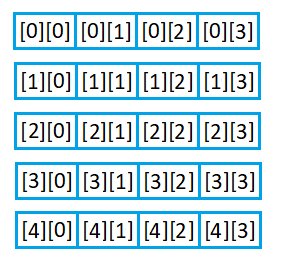
When declaring a multidimensional array variable, you use a separate pair of square brackets for each additional dimension. For example, this is how you create a two-dimensional array with 5 rows and 4 columns:
int[][] twoD = new int[5][4];The following image shows a visual representation of a two-dimensional array 5 by 4. The left index represents the row, and the right index represents the column:
Filling and Iterating with Loops
The example below demonstrates how to set values in a 5x4 Java 2D array. The outer for loop iterates through rows, and the inner loop through columns. Each next element is assigned a value one greater than the previous:
public class TwoDArrayExample1 {
    public static void main(String[] args) {
        int[][] twoD = new int[5][4];
        int value = 0;
        for (int i = 0; i < 5; i++) {
            for (int j = 0; j < 4; j++) {
                twoD[i][j] = value++;
                System.out.print(twoD[i][j] + " ");
            }
            System.out.println();
        }
    }
}
Program output:
0 1 2 3
4 5 6 7
8 9 10 11
12 13 14 15
16 17 18 19
Here the array is printed element by element in a loop. To print the contents of a multidimensional array as a single string, there is the Arrays.deepToString() method — see the dedicated lesson “Method Arrays.deepToString()” for more.
How a Multidimensional Array Is Stored in Memory
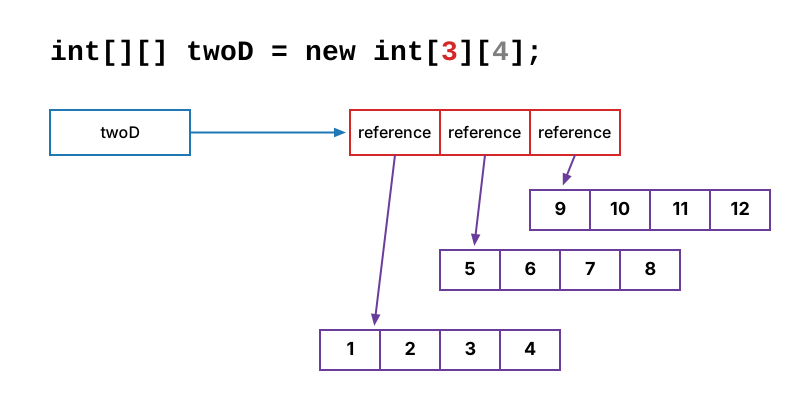
Let’s now see how a two-dimensional array int[][] twoD = new int[3][4]; is represented in memory. The variable twoD doesn’t point to a matrix, but to an array (shown in red) of three elements. The value of each element is a reference to a row of four elements (shown in purple):
The next image illustrates how a three-dimensional array int[][][] threeD = new int[3][4][2]; is stored in memory:
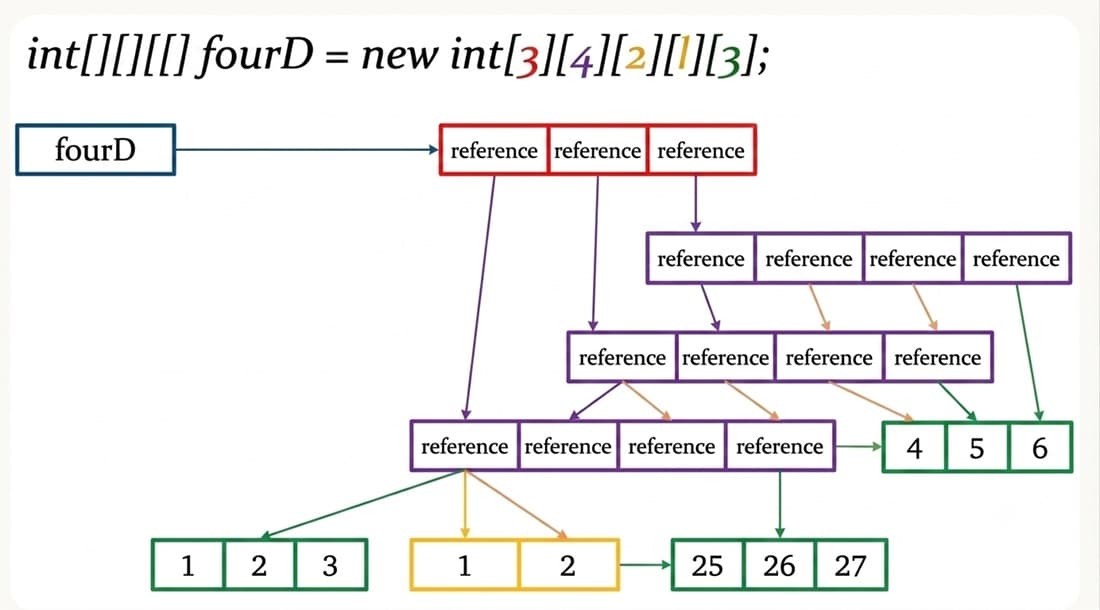
Arrays of any dimension are stored in memory the same way in Java.
Important
Each row of a two-dimensional array is a separate object on the heap. If you declare an array as new int[4][] and access a row before allocating memory for it, you get a NullPointerException: nested references are null by default.
Jagged Arrays: Rows of Different Lengths
In the two-dimensional arrays we’ve examined so far, each row has the same number of elements — and that’s typical. But it’s not required: each row can have a different number of elements. Such arrays are called jagged arrays. For example:
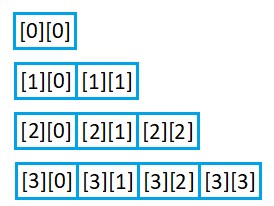
Here is the code that implements such an array. When declaring the two-dimensional array, you set the size of the first dimension only — int[][] array = new int[4][]. This specifies the number of rows but doesn’t allocate memory for the rows themselves. Then memory is allocated separately for each row. For example, the row at index zero has size 1 — array[0] = new int[1]:
public class TwoDArrayExample2 {
    public static void main(String[] args) {
        int[][] array = new int[4][];
        array[0] = new int[1];
        array[1] = new int[2];
        array[2] = new int[3];
        array[3] = new int[4];
        int value = 0;
        for (int i = 0; i < array.length; i++) {
            for (int j = 0; j < array[i].length; j++) {
                array[i][j] = value++;
                System.out.print(array[i][j] + " ");
            }
            System.out.println();
        }
    }
}
Note that the loop bounds are not hardcoded constants but array.length and array[i].length — this way the iteration works for rows of any length. A multidimensional array has no single “matrix size” property: array.length is the number of rows, and each row’s length is queried separately. See the dedicated lesson “Length of Arrays” for a deeper dive into array length.
Initialization at Declaration
You can also use an initialization block with multidimensional arrays if all element values are known in advance. Each row is placed within curly braces, and a nested for-each loop is a convenient way to iterate:
public class TwoDArrayExample3 {
    public static void main(String[] args) {
        double[][] arrayTwoD = {
                {0, 1, 2, 3},
                {4, 5, 6, 7},
                {8, 9, 10, 11},
                {12, 13, 14, 15}
        };
        for (double[] arrayOneD : arrayTwoD) {
            for (double element : arrayOneD) {
                System.out.print(element + " ");
            }
            System.out.println();
        }
    }
}
The integer literals are automatically converted to type double, so the program prints 0.0 1.0 2.0 3.0 and so on.
Frequently Asked Questions
Can I specify only the second dimension when creating an array, like new int[][4]?
No, that’s a compilation error. The first (leftmost) dimension is mandatory because the outer array of references must be created right away. The correct form is new int[4][] — the rows can be allocated later.
How is a Java 2D array different from a matrix in C/C++?
In C, a two-dimensional array is one contiguous block of memory. In Java, it’s an array of references to separate one-dimensional arrays: the rows live independently on the heap, can have different lengths, and can even be null.
How do I copy a two-dimensional array?
clone() and Arrays.copyOf() copy only the outer array of references — both copies will share the same rows. For a full (deep) copy, you need to copy each row separately in a loop.
How do I compare two multidimensional arrays?
Use Arrays.deepEquals(a, b). The Arrays.equals() method compares nested arrays by reference, not by content, so for multidimensional arrays it returns false even when the values are identical.
Comments